
Looks like you've started your Godot journey! You'll have a lot to learn, and you will make plenty of mistakes. Git will help you keep track of changes to your project, and revert to previous snapshots.
To use Git, I'd heavily recommend using a graphical git-client. The one I will be using in this guide is GitHub Desktop.
Git can also be used to collaborate with others, but more on that later. First we'll go over the basics.
Git is a really useful piece of software, originally developed by Linus Torvalds.
GitHub is a website/platform, and Git is a central part of how GitHub works. However, GitHub is not associated with Git itself. There are plenty of other websites like GitHub, like GitLab & Codeberg.
GitHub Desktop is a graphical git-client. That just means that you can click buttons in a neat app instead of having to type commands on the command-line.
First, download and install GitHub Desktop. You don't need an account to get started, the program can be used 100% locally.
I might expand this section later. The installer should be friendly enough, but if you encounter an issue or have questions, ask someone for help! (For example, the person who linked this page to you ^^)
A repository is really just a fancy name for a folder with Git version control in it. Once you have version control enabled, you can use GitHub Desktop to see what files have changed since the latest commit. The program doesn't have to be open for this tracking to work; as long as you don't delete the ".git" folder that holds the version control data, everything will work just fine.
A .gitignore file tells Git which files to ignore, and therefore keep out of the version control history. We'll want to tell Git to ignore the .godot folder in our project, as it contains automatically generated cache files and other things like that.
Godot actually places a .gitignore file into your project by default, so most likely you don't have to worry about this! If you don't have a gitignore file for whatever reason, you'll need to create one. Make sure you have file extensions visible, as we'll need to make a file that doesn't have a file extension.
Once you have file extensions visible, create a file called .gitignore (not .gitignore.txt), and write the following into the file with notepad:
.godot/
...and you're done!
First and foremost: do NOT use the "Create new repository" -button!
GitHub Desktop really does not want to use an existing folder for a new repository, so we have to create the repo in a roundabout way.
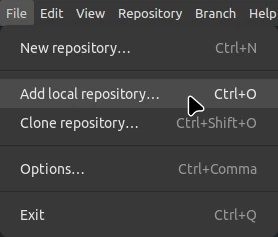
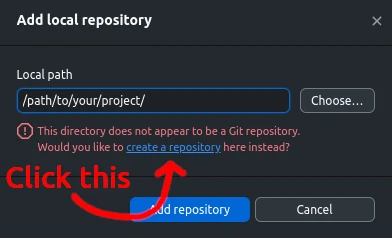
And you have your repository set up!
From here on out, you're on your own. Or, you can ask help from the person who linked this page to you!
In any case, I will be extending this article/tutorial/whatever when I get a chance to.
PS. I stream game development every Saturday at 6AM Helsinki time! Currently making my own blocky game engine :)